








Online reviews are one of the most influential factors in how customers choose businesses today. Google reviews, in particular, play a major role in local search visibility, credibility, and consumer trust.
Because of this influence, Google has strict policies governing how businesses request and collect reviews. One of the most important rules businesses must understand is the prohibition of review gating.
Organizations that use structured feedback workflows sometimes ask an important configuration question:
If Google is included in the “Great” workflow, why must it also appear in the “Ok” and “Unpleasant” workflows?
The answer comes down to review gating compliance and fair review solicitation practices.
This article explains what review gating is, why Google prohibits it, and how businesses can structure feedback workflows responsibly.
Table of Contents
- What Is Review Gating?
- Is Review Gating Allowed by Google?
- Why Review Gating Is Risky
- Example of Review Gating in Workflows
- Why Google Must Appear Across All Workflows
- Why Google Is Often a Secondary Option
- Best Practices to Avoid Review Gating
- How Experience.com Helps
- Key Takeaways
- FAQs
What Is Review Gating?
Review gating is the practice of filtering customers based on their feedback and only directing satisfied customers to leave public reviews on platforms like Google.
Typically, review gating happens through a feedback survey or rating flow such as:
- A customer receives a feedback request.
- They indicate whether their experience was positive or negative.
- Only customers with positive feedback are shown links to public review sites.
- Customers with neutral or negative feedback are redirected to private forms or internal surveys.
In this scenario, unhappy customers are prevented from leaving public reviews, while happy customers are encouraged to do so.
This creates an artificially positive public reputation, which is why Google considers review gating a violation of its policies.

Is Review Gating Allowed by Google?
No. Google explicitly prohibits review gating.
Google’s review policies state that businesses should not discourage or prohibit negative reviews or selectively solicit positive reviews from customers.
In other words, businesses should not:
- Ask only satisfied customers to leave reviews
- Prevent dissatisfied customers from leaving reviews
- Filter customers before giving them access to review platforms
Google’s goal is to ensure that reviews reflect genuine customer experiences, both positive and negative.
If businesses manipulate this process, it undermines the trust consumers place in online reviews.

Why Review Gating Can Be Risky for Businesses
Ignoring review gating policies can create several risks for businesses.
1. Violation of platform guidelines
Businesses that gate reviews may be violating Google’s review policies.
2. Review removal
If Google detects manipulated review practices, reviews may be removed or filtered.
3. Reduced consumer trust
Customers rely on authentic feedback. A reputation built on filtered reviews can damage credibility if discovered.
4. Regulatory concerns
Regulators have increasingly focused on deceptive review practices, and businesses must ensure their review collection methods are transparent and fair.
Because of these risks, businesses should design their feedback processes carefully.
A Common Example of Review Gating
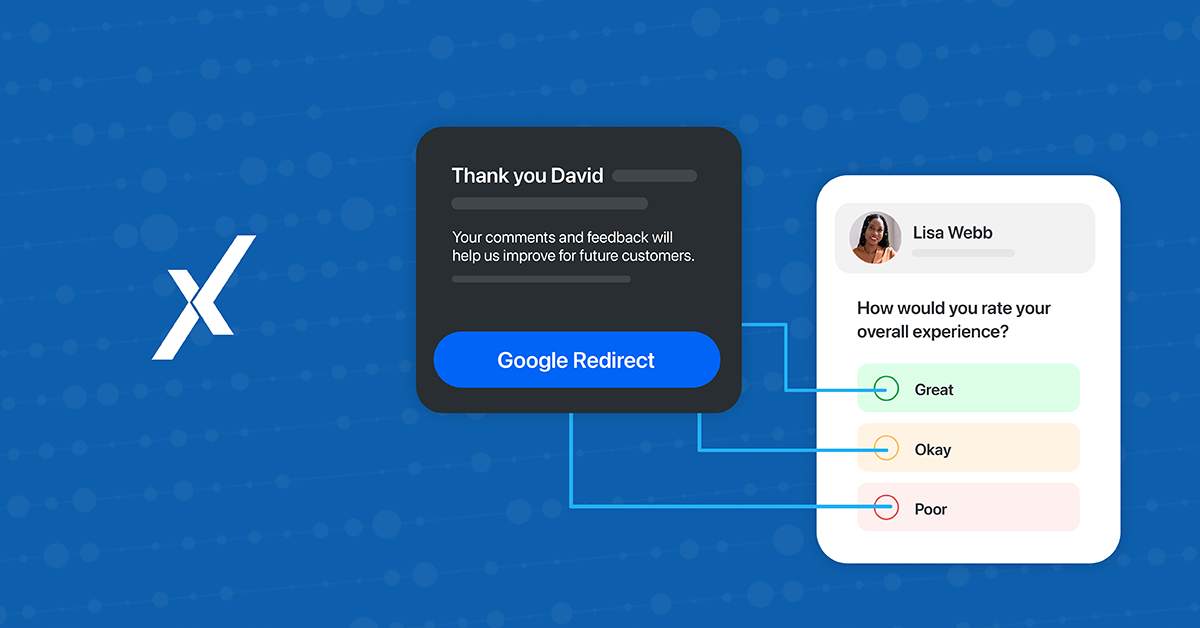
Consider a workflow that looks like this:
- Great experience → Show Google review link
- Ok experience → Show internal feedback form only
- Unpleasant experience → Route feedback internally
In this case, only customers who reported a positive experience are given the opportunity to leave a Google review.
Customers who reported neutral or negative experiences are prevented from accessing the review platform.
This is exactly the type of review gating scenario that Google’s policies aim to prevent.
Why Google Must Appear in Great, Ok, and Unpleasant Workflows
When Google is included in the Great workflow, it means customers who report a great experience are invited to leave a review on Google.
However, if Google does not appear anywhere in the Ok or Unpleasant workflows, then only satisfied customers are given access to that review platform.
This effectively filters which customers are allowed to leave public reviews, creating a review gating situation.
To avoid this issue, Google should also appear in either the Primary or Secondary third-party review sites within the Ok and Unpleasant workflows.
This ensures that:
- All customers have access to the same public review platforms
- The review collection process remains transparent
- Businesses remain aligned with Google’s policies
Providing access to the same review sites across different experience levels helps maintain a fair and unbiased feedback process.

Why Many Businesses Add Google as a Secondary Review Option

Many organizations choose to include Google as a Secondary third-party review option within the Ok and Unpleasant workflows.
Placing Google as a Secondary option is a best-practice approach.
Why?
✔ Maintains compliance
✔ Keeps Google accessible
✔ Encourages internal feedback first
Benefits:
- Issues can be resolved early
- Customers still retain full review freedom
- Businesses maintain ethical practices
This creates a balance between:
- Customer experience improvement
- Reputation management
- Platform compliance
Best Practices to Avoid Review Gating
Businesses that want to build a strong online reputation should follow these best practices:
- Give all customers equal access to review platforms
Customers should be able to access public review sites regardless of whether their experience was positive or negative.
- Avoid filtering customers before review requests
Do not design workflows that intentionally prevent dissatisfied customers from leaving reviews.
- Use feedback to improve service
Negative feedback should be viewed as an opportunity to identify issues and improve customer experience.
- Focus on authentic reputation building
Authentic reviews, both positive and negative, build stronger credibility than filtered feedback.
How Experience.com Helps Businesses Stay Compliant
Experience.com’s Experience Management Platform (XMP) helps businesses:
- Collect feedback ethically
- Structure compliant workflows
- Improve visibility across search and AI discovery
By ensuring review platforms like Google are accessible across all feedback types, businesses can:
- Maintain compliance with review policies
- Build trust with authentic customer feedback

Key Takeaways
- Review gating is not allowed by Google
- Filtering customers based on sentiment violates policy
- Google must be included across workflows to ensure fairness
- Secondary placement is a recommended best practice
- Authentic reviews build long-term credibility
Ready to Improve Your Visibility and Reputation?
See how Experience.com helps businesses turn customer experiences into measurable growth across search, reputation, and AI-driven discovery.
👉 Request a demo today
Frequently Asked Questions
What is review gating?
Review gating is the practice of filtering customer feedback so that only satisfied customers are encouraged to leave public reviews, while customers with neutral or negative experiences are directed to private feedback channels.
For example, a business might ask customers to rate their experience first. Customers who give a high rating are shown links to leave reviews on Google, while customers who give lower ratings are redirected to internal surveys. This selective process prevents some customers from leaving public reviews and can create a misleading online reputation.
Because of this, many major review platforms—including Google—prohibit review gating.
Is review gating allowed by Google?
No. Google does not allow review gating.
According to Google’s review policies, businesses should not discourage or prohibit negative reviews or selectively solicit positive reviews from customers. This means businesses should not design review collection processes that only direct satisfied customers to leave reviews while blocking others.
To remain compliant, businesses should ensure that all customers have access to the same review platforms regardless of their experience.
Why must Google be included in Ok and Unpleasant workflows?
If Google is included in the Great workflow but not in the Ok or Unpleasant workflows, only satisfied customers would have the opportunity to leave Google reviews.
This creates a review gating scenario, because neutral or dissatisfied customers are effectively prevented from accessing the same review platform.
Including Google in either the Primary or Secondary third-party review sites within the Ok and Unpleasant workflows ensures that all customers have equal access to leave reviews, helping businesses remain compliant with Google’s policies.
What happens if a business violates Google’s review policies?
If Google determines that a business is using manipulative review practices, several actions could occur, including:
- Removal of reviews that violate policies
- Restrictions on review collection practices
- Reduced trust in the business’s Google profile
Following review solicitation guidelines helps protect a business’s online reputation and maintain credibility with customers.
Why do some businesses place Google as a secondary review option?
Many organizations choose to include Google as a Secondary third-party review site in Ok and Unpleasant workflows.
This configuration allows businesses to:
- Maintain access to Google reviews for all customers
- Encourage customers to share feedback directly with the business first
- Address potential issues internally before they become public concerns
Placing Google as a secondary option helps balance compliance, customer experience improvement, and reputation management.
How can businesses collect reviews without violating review gating rules?
To avoid review gating, businesses should follow several best practices:
- Provide equal access to review platforms for all customers
- Avoid filtering customers based on sentiment before showing review links
- Encourage honest feedback from all customers
- Use customer feedback to improve products and services
Building a strong reputation comes from authentic and transparent review collection, not from selectively requesting positive feedback.